Your schedule
Every request shows the time, place and length of the job. Accept the ones that fit your week and turn down the rest. Nobody assigns you shifts.
Servi is a new app that connects people across Aruba with trusted local service providers. Join as a Servi provider to offer your services, work the hours you choose, and get paid for every job you complete.
Servi is a booking app for everyday services, from cleaning and repairs to car care, moving and yard work. Customers book trusted local providers in a few taps. Servi providers work independently. They choose the services they offer, the hours they work, their rates, and the parts of the island they cover.
You already have the skills. Servi helps you find the customers and keeps track of the work.
Every request shows the time, place and length of the job. Accept the ones that fit your week and turn down the rest. Nobody assigns you shifts.
You set your own price, as an hourly rate or a fixed price per task. Servi only takes a commission when you complete a job. It's free to join, and nothing is charged while you wait for work.
Every finished job is recorded in the app with what you earned. Servi handles the payment side, so you can move on to the next job.
Your ratings, reliability score and ID-verified badge appear on your profile. Good work brings in more bookings over time.
Here is every step from sign-up to your first payout.
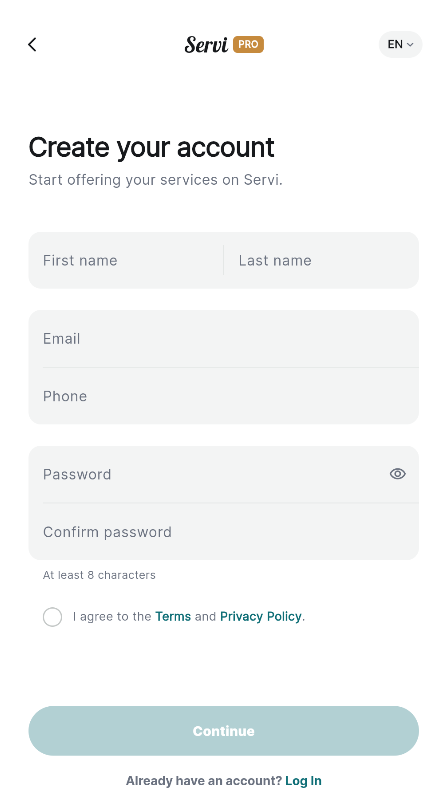
Create your account with your name, email and phone number.
Add a short bio and a profile picture, verify your identity with a photo ID, and set the hours you're available to work.
Choose the services you want to offer, such as cleaning, repairs, car care or moving.
Tip: uploading qualifications or references improves your chances of approval. For some services they're required.
Different services call for different qualifications and levels of trust, so we review each service you list on its own. Once a service is approved, customers nearby can book you for it.
Accept the requests that fit your schedule, and use the in-app chat to ask questions or confirm details with the customer. On the day of the job, you update them as you go: on the way, arrived, started, finished.
Your earnings are tracked for each job. Every completed job also adds to your rating and reliability score, which helps you get more bookings.
Servi takes between 8% and 15% of each completed job. Joining is free, and nothing is charged while you're not working.
The rate depends on the type of task. Jobs with more risk, like moving heavy furniture or working on a ladder, need more support when something goes wrong, so their commission is higher.
3-hour deep clean at Afl. 45/hr
Example only. The exact commission depends on the task category.
Running a safe, busy marketplace has real costs. Instead of charging you a sign-up fee or a monthly subscription, Servi covers them with a share of each completed job.
If a job goes wrong, Servi helps sort it out, so neither you nor the customer is left on your own. Riskier jobs carry a higher commission to cover this.
Our team helps you and your customers with questions about the app, scheduling problems and disputes, so you can focus on the job.
Servi advertises across the island, so customers come to you through the app.
App updates and hosting, automatic earnings tracking, and a person reviewing every Servi provider application.
Before you can be booked for a service, someone on our team checks your identity and your experience with that kind of work. That can be a certificate, but also references, photos of past jobs or years of doing it. Customers book with confidence, and you only compete with other vetted professionals.
No. Joining the waitlist and creating a Servi provider profile are both free. Servi only earns a commission (8–15%) when you complete a job.
Some jobs carry more risk, such as heavy lifting or working at height. When something goes wrong on those jobs, it takes more time and support to sort out, so their commission is higher.
You work as an independent provider, so you're responsible for your own work. If something goes wrong on a job booked through the app, Servi helps sort it out. Some higher-risk services require your own liability insurance. Full details will be shared before launch.
You're paid for each job you complete, and the app tracks your earnings automatically. You never need to send an invoice.
We're working on a payment setup that holds the money for each job safely until the work is done, so you don't have to collect it yourself. If there's a disagreement, our team looks into it carefully and works with both you and the customer to find a fair solution. Full payment details will be shared before launch.
You can still join the waitlist today. You can upload your ID, qualifications and references later, when you set up your profile and services.
Yes. For many services, experience and references are enough. Specialised work, like electrical or plumbing, does require the right qualifications. If you're unsure, join the waitlist and we'll help you figure out what you need.
No. You choose your service area, and you'll only get requests from there.
Sign up now and we'll email you the moment Servi goes live. Early sign-ups are reviewed first, so you're ready to take jobs from day one.
We'll email you as soon as Servi launches.